Creating “Edit” Links That Open Plain-Text Source Files in a Native App
The setup for my notes blog looks like this:
- Content is plain-text markdown files (synced via Dropbox, editable in iA Writer on my Mac, iPad, or iPhone)
- Codebase is on GitHub
- Builds are triggered in Netlify by a Shortcut
I try to catch spelling issues and what not before I publish, but I’m not perfect.
I can proofread a draft as much as I want, but nothing helps me catch errors better than hitting publish and re-reading what I just published on my website.
If that fails, kind readers will often reach out and say “Hey, I found a typo in your post [link].”
To fix these errors, I will:
- Open iA Writer
- Find the post
- Fix typo
- Fire Shortcut to trigger a build
- Refresh my website and see the updated post
However, the “Open iA Writer” and “Find the post” are points of friction I’ve wanted to optimize.
I’ve found myself thinking: “When I’m reading a post on notes.jim-nielsen.com and I spot a mistake, I wish I could just click an ‘Edit’ link right there and be editing my file.”
You might be thinking, “Yeah that’s what a hosted CMS does.”
But I like my plain-text files. And I love my native writing app.
What’s one to do?
Well, turns out iA Writer supports opening files via links with this protocol:
ia-writer://open?path=location:/path/to/file.md
So, in my case, I can create a link for each post on my website that will open the corresponding plain-text file in iA Writer, e.g.
<article>
  <!-- content of post here -->
  <a href="ia-writer://open?path=notes:2026-01-04T2023.md">
    Edit
  </a>
</article>
And voilà, my OS is now my CMS!
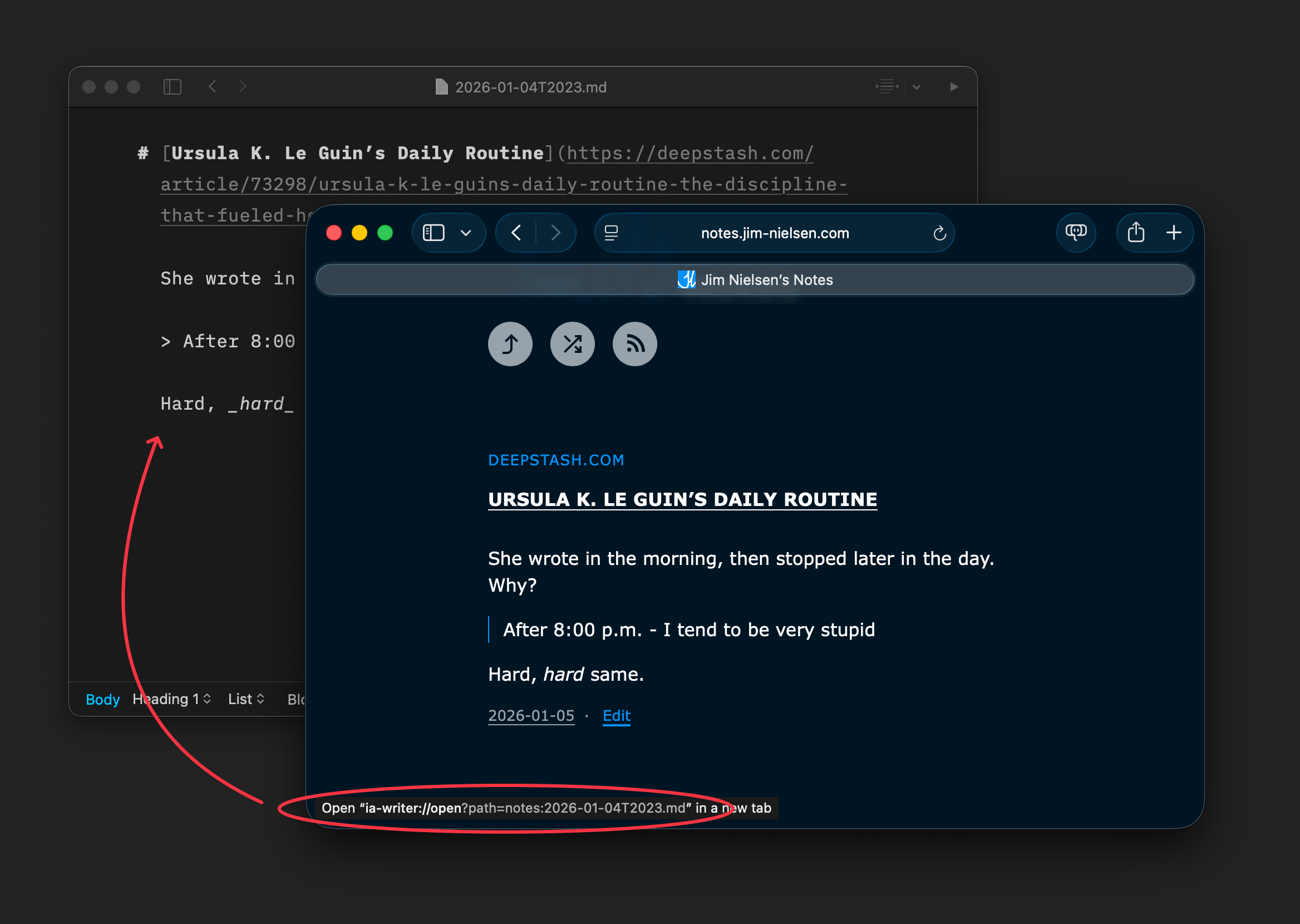
It’s not a link to open the post in a hosted CMS somewhere. It’s a link to open a file on the device I’m using — cool!
My new workflow looks like this:
- Read a post in the browser
- Click “Edit” hyperlink to open plain-text file in native app
- Make changes
- Fire Shortcut to trigger a build
It works great. Here’s an example of opening a post from the browser on my laptop:
And another on my phone:
Granted, these “Edit” links are only useful to me. So I don’t put them in the source markup. Instead, I generate them with JavaScript when it’s just me browsing.
How do I know it’s just me?
I wrote a little script that watches for the presence of a search param ?edit=true. If that is present, my site generates an “Edit” link on every post with the correct href and stores that piece of state in localstorage so every time I revisit the site, the “Edit” links are rendered for me (but nobody else sees them).
Well, not nobody. Now that I revealed my secret I know you can go get the “Edit” links to appear. But they won’t work for you because A) you don’t have iA Writer installed, or B) you don’t have my files on your device. So here’s a little tip if you tried rendering the “Edit” links: do ?edit=false to turn them back off :)