Don’t Forget These Tags to Make HTML Work Like You Expect
I was watching Alex Petros’ talk and he has a slide in there titled “Incantations that make HTML work correctly”.
This got me thinking about the basic snippets of HTML I’ve learned to always include in order for my website to work as I expect in the browser — like “Hey I just made a .html file on disk and am going to open it in the browser. What should be in there?”
This is what comes to mind:
<!doctype html>
<html lang="en">
<meta charset="utf-8">
<meta name="viewport" content="width=device-width,initial-scale=1.0">
Why each?
doctype
<!doctype html>
Without <!doctype html>, browsers may switch to quirks mode, emulating legacy, pre-standards behavior. This will change how calculations work around layout, sizing, and alignment.
<!doctype html> is what you want for consistent rendering. Or <!DOCTYPE HTML> if you prefer writing markup like it’s 1998. Or even <!doCTypE HTml> if you eschew all societal norms. It’s case-insensitive so they’ll all work.
html lang
<html lang="en">
Declare the document’s language. Browsers, search engines, assistive technologies, etc. can leverage it to:
- Get pronunciation and voice right for screen readers
- Improve indexing and translation accuracy
- Apply locale-specific tools (e.g. spell-checking)
- And more…
Omit it and things will look ok, but lots of basic web-adjacent tools might get things wrong. Specifying it makes everything around the HTML work better and more accurately, so I always try to remember to include it.
meta utf-8
This piece of info can come back from the server as a header, e.g.
return new Response(
    "<!doctype html><h1>Hello world</h1>",
    {
        status: 200,
        headers: { "Content-Type": "text/html; charset=utf-8" },
    }
);
But I like to set it in my HTML, especially when I’m making files on disk I open manually in the browser.
<meta charset="utf-8">
This tells the browser how to interpret text, ensuring characters like é, ü, and others display correctly.
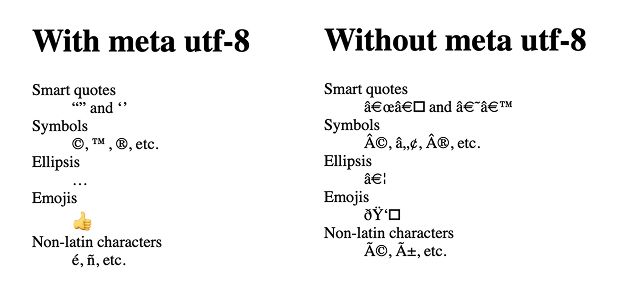
So many times I’ve opened a document without this tag and things just don’t look right — like my smart quotes.
For example: copy this snippet, stick it in an HTML file, and open it on your computer:
<!doctype html>
<h1>Without meta utf-8</h1>
<dl>
  <dt>Smart quotes</dt>
  <dd>“” and ‘’</dd>
  <dt>Symbols</dt>
  <dd>©, ™, ®, etc.</dd>
  <dt>Ellipsis</dt>
  <dd>…</dd>
  <dt>Emojis</dt>
  <dd>👍</dd>
  <dt>Non-latin characters</dt>
  <dd>é, ñ, etc.</dd>
</dl>
Things might look a bit wonky. But stick a <meta charset="utf-8"> tag in there and you’ll find some relief.
Meta viewport
<meta name="viewport" content="width=device-width,initial-scale=1.0">
Sometimes I’ll quickly prototype a little HTML and think, “Great it’s working as I expect!” Then I go open it on mobile and everything looks tiny — “[Facepalm] you forgot the meta viewport tag!”
Take a look at this screenshot, where I forgot the meta viewport tag on the left but included it on the right:
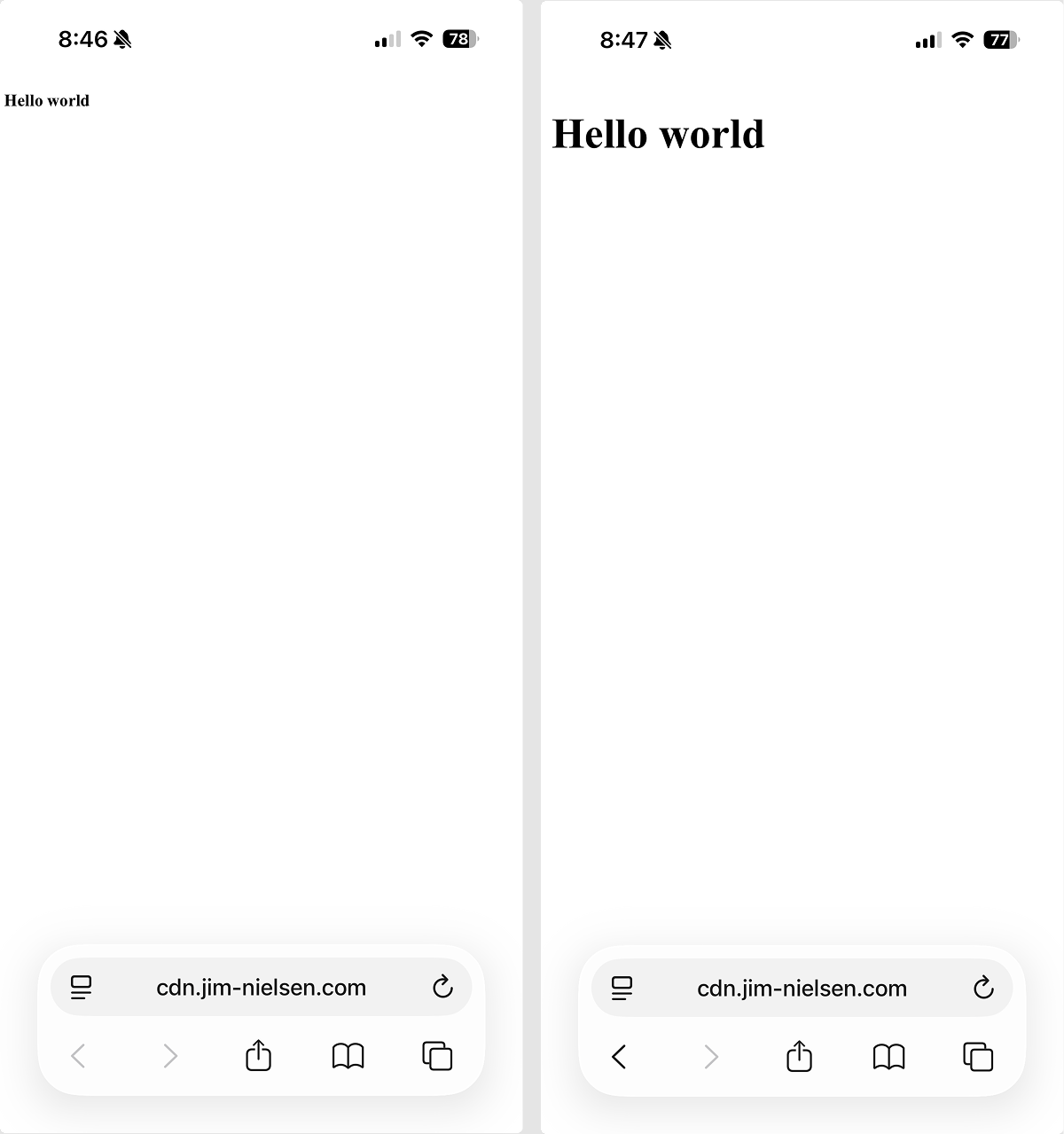
That ever happen to you? No, just me? Well anyway, it’s a good ‘un to include to make HTML work the way you expect.
Last But Not Least…
I know what you’re thinking, I forgot the most important snippet of them all for writing HTML:
<div id="root"></div>
<script src="bundle.js"></script>
Lol.